
Case study · Piqo Studio
Iconly: selling icons to the people who draw them
I co-founded a small design studio that turned a free icon set into a paid product: a Figma plugin, a web app and a desktop app, plus 3D assets and illustration packs sold on Gumroad.
Co-founder and product designer · Nov 2019 – Jan 2024
Product direction, icon system, pricing, launches · Design tools

The Iconly Pro web app, 2023: categories, types and styles on the left, the library in the middle, size and color on the right.
At a glance
Role
Co-founder and product designer at Piqo Studio (formerly Piqo Design): product direction, the icon visual language, landing pages and launches, pricing and plans, and a team of 9 designers.
Timeline
November 2019 to January 2024.
Products
Iconly and Iconly Pro (icon system, Figma plugin, web app, Electron desktop app), 3D icon and illustration packs.
Channels
Our own site with Personal and Team plans, Figma Community, Gumroad, Craftwork, Product Hunt and Dribbble.
Team
Co-founders, plus up to 9 designers, 3 of them interns. Developers were contractors.
Status
Iconly Pro is still live, run by the current team. I left in January 2024.
What Iconly is
In 2019 a few of us started a studio and kept running into the same small pain: icon sets were inconsistent, with different stroke weights, odd naming and missing states, and they were hard to use in Figma. By May 2020 we had Iconly, a set with a strict system: five styles in two corner types, with the same metaphor drawn the same way in every style.
Our buyers could copy anything, compared us to free alternatives, worked in a tool we didn’t control, and lived in countries with very different incomes.
The problem was never “draw nice icons”. It was how to make a living selling design files to designers.
Specimen · one metaphor
5 styles · 2 corner types

01 Light

02 Bold

03 Bulk

04 Two-tone

05 Broken

06 Light, curved
One metaphor in all five styles. The last cell is Light again with curved corners, the second corner type. Every concept in the library follows this grid.
By the numbers
Nine numbers, and what each one counts
I’ve quoted these in different places over the years. They measure different things over different periods, so here is each one next to what it counts.
10,000+
Customers
People who paid for Iconly Pro.
$100K+
Revenue per quarter
Studio revenue in a quarter, across the paid products.
$8K
Launch sales
Sales in the first 10 hours after a launch went live.
12K
Users
People using the Iconly Pro product.
300K+
Figma Community file
Designers who used the free Iconly file on Figma Community.
260K+
Figma plugin
People who used the Iconly plugin inside Figma.
70%
Faster icon loading
Icon load time in the Figma plugin after a rebuild, against the version before it.
9
Designers led
The team at its peak, 3 of them interns.
5 × 2
Styles × corner types
Light, Bold, Bulk, Two-tone and Broken, each Curved and Sharp.
They don’t line up into one funnel, which is a lesson in itself. More on that at the end.
PRD snapshot
The brief we gave ourselves
Goals
Make Iconly the default icon system for product designers inside Figma, turn free users into paid plans, and build a range of products so one audience could buy more than once.
Users
UI and product designers, freelancers and small product teams. Enterprise teams later asked for custom icons and team plans.
Success criteria
Plugin installs and usage, paid conversions, sales at launch, and icon load speed in the plugin.
Non-goals
Custom illustration as the core business. A general-purpose stock marketplace.
Constraints
A studio based in Iran and then Türkiye, with limited access to Western payment rails and app-store accounts. A small team. Distribution on platforms we didn’t own: Figma Community and Gumroad.
Challenge 01 / 05
Free versus paid, when your competitor is free
Situation
Iconly started as a free Figma Community file and plugin. That’s how it spread, and why people expected it to stay free.
What made it hard
Designers pay for a workflow, not for files they can screenshot. Locking everything kills distribution. Locking nothing kills the business.
Plan map · free core, paid workflow
Free
Core set
In the Figma plugin, for everyone. How Iconly spread.
Iconly Pro · full library, more styles and formats
Yearly
Lifetime
Personal
Freelancers
Renews every year.
Pay once. For people who distrust subscriptions.
Team
Agencies and product teams
Renews every year.
Pay once.

Plans inside the Iconly Pro app, 2023: Personal and Team, each yearly or lifetime.
Decision
Freemium. A free core set in the Figma plugin, and Iconly Pro for the full library, more styles and formats, sold as Personal and Team plans, each yearly or lifetime.
Outcome
The plan structure is still the basis of iconly.pro today: Personal versus Team, with lifetime still answered in the FAQ.
Challenge 02 / 05
One price for a global audience
Situation
Our buyers were in the US and Europe, but also in South and Southeast Asia, Latin America and the Middle East.
What made it hard
One USD price is too expensive in half those markets, and it invites piracy there.
How a price was built
+
List price
One USD price for everyone, never cut by a sitewide sale.
−
Country discount
Purchasing-power parity by country, set up with DealParity.
−
Targeted codes
For communities, students and creators, never for everyone.

An Iconly Pro invoice for a Personal lifetime plan: the list price on the first line, the discount as its own line below it.
Decision
Purchasing-power-parity discounts by country, through DealParity, and targeted codes for communities and students instead of sitewide sales. The list price stayed intact.
Outcome
Other founders later asked how we had set up country-based pricing. It became a pattern people copied.
Challenge 03 / 05
Shipping into platforms we didn’t control
Situation
Most of Iconly’s value was delivered inside Figma, then through a web app and a Mac app.
What made it hard
We owned none of those platforms. Any of them could break the product, and every fix went through someone else’s support queue.
Incidents · Jan 2022 – Dec 2023
1 tick = 1 month
1
2
3
4
2022
2023
1 · May 2022 · Figma Community
The Iconly source file disappeared
It vanished from Community while we prepared the next major version. Figma support restored it.
2 · Feb 2023 · Our site
Outages on our own site
We put the site behind a public status monitor.
3 · Mar 2023 · Figma
The plugin lived on a personal account
Iconly v2.3 moved to the Iconly Pro organisation account, through Figma support. Users kept access.
4 · May–Jun 2023 · Apple
The Mac app failed notarization for weeks
Account authorization and package signing. The Electron build was eventually signed.
Decision
Treat the platforms as hostile infrastructure: move every product to company-owned accounts, keep our own site as the source of truth for licences, and keep the plugin thin and fast.
Outcome
The plugin moved without users losing access, and the desktop build was eventually signed. A design-products business is really an ops business.
Challenge 04 / 05
Thousands of icons, one hand
Situation
The library grew from one set to thousands of icons across 5 styles and 2 corner types, then 3D and animated icons.
What made it hard
Every new designer drew a slightly different “home” icon. Search depends on naming, and naming drifted.
The icon pipeline
Step 01
Draw
On one grid, with stroke and corner rules for each style.
Step 02
Name and tag
One naming convention, so search finds the same icon in every style.
Step 03
Dashboard
New icons uploaded and tagged in one place, not by hand in Figma.
Step 04
Ship
The plugin, web app and desktop app draw from the same library.
Decision
I defined the visual language (grid, stroke and corner rules per style), the naming conventions and the file structure, and set up onboarding and critique for the 9-person team, 3 of them interns.
We added a dashboard so new icons were uploaded and tagged in one place.
Outcome
One consistent system that teams adopted as a standard. Designers still list Iconly next to Remix Icon and Iconoir as a go-to set.
Challenge 05 / 05
More products for the same audience
Situation
One product per audience caps revenue.
What made it hard
Every new line needed its own files, store pages and launch, from the same small team.
One audience, many shelves
Iconly
The free set that started it.
Iconly Pro
The full library: Figma plugin, web app, Mac app.
Iconly 3D and animated
3D and animated icon lines.
Illustration packs
One pack carried 260 illustrations.
Icon manager
App and Figma plugin, launched March 2024.
Own means our own site and apps. Each product is marked only where it was sold.
Iconly 3D shape icons, grid
Iconly 3D shape icons.
Iconly icon manager: desktop app and Figma plugin (Dribbble, March 2024)
The Iconly icon manager, app and Figma plugin.
Decision
We added Iconly 3D and an animated-icon line, illustration packs, and the Iconly icon manager. We also got into Craftwork’s catalogue.
Outcome
Several products sold to the same customers through Gumroad and our own site.
Design decisions
Designed around the workflow, not the files
Icon system
Five styles in two corner types, one metaphor per concept across all of them, and strict naming so search works.
Plugin
Search first, a style switcher, copy or insert, and one-click style swapping for selected icons. Load speed was a product metric.
Web app
An infinite-scroll grid, multi-select that survives a reload, and ZIP export.
Launches
Webflow landing pages, a Dribbble shot for each feature, and motion for social.
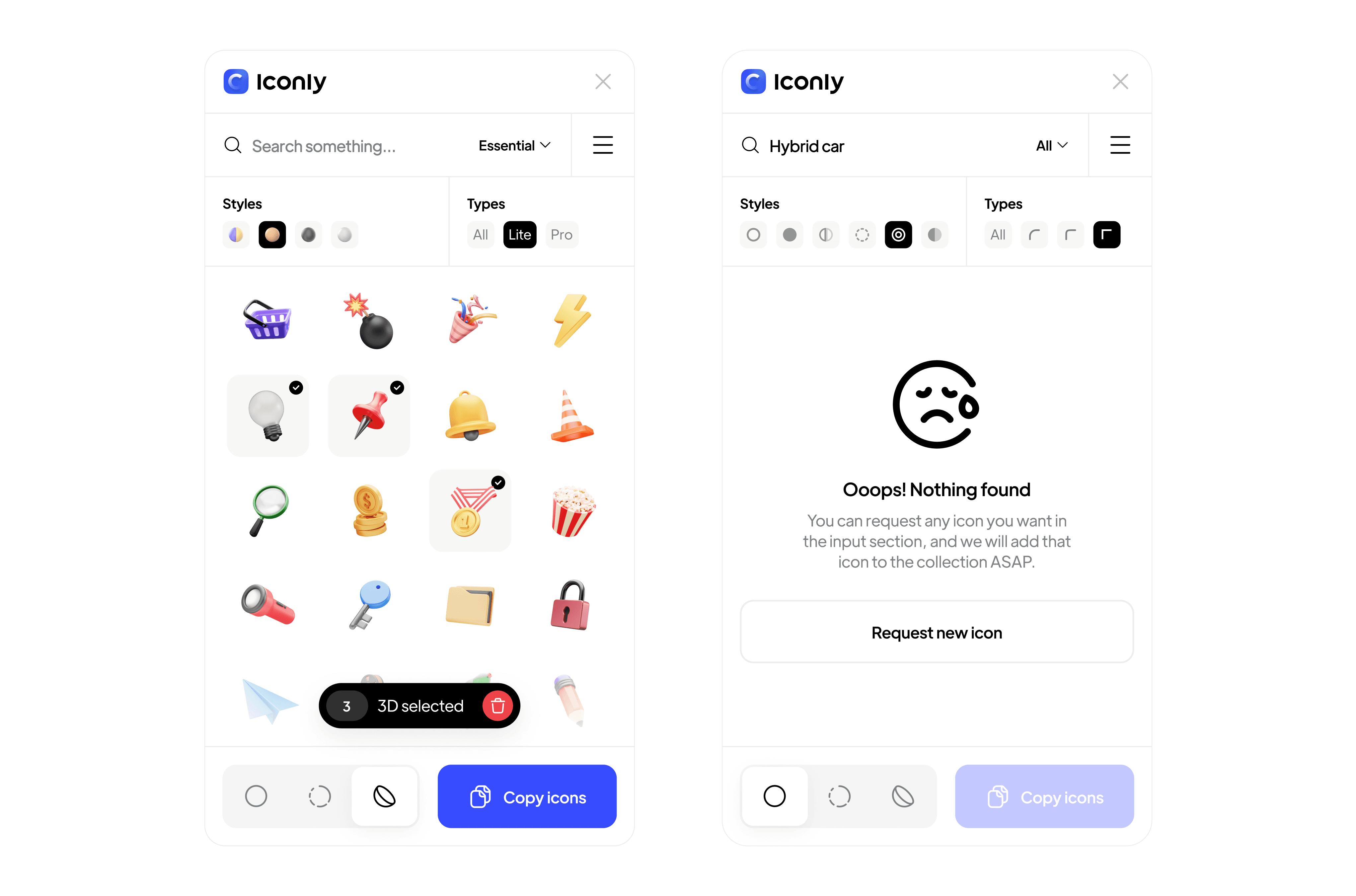
The Figma plugin: 3D icons with multi-select, and an empty state that turns a failed search into an icon request.

Update and new-icon notices inside the desktop app.

Settings: theme, grid density, and color and stroke controls.

Sign-up for Iconly Pro.
What I learned
01
Designers pay for workflow, not files.
The plugin and the plans made money. The ZIP of icons was marketing.
02
Own your accounts.
Every product should live under a company identity from day one. Moving it later costs weeks of support tickets.
03
Pricing is product design.
Country pricing and lifetime plans changed who could buy more than any new icon did.
04
Track one clean metric set from day one.
I can tell this story with nine numbers, but I can’t line them up into one funnel. Next time there will be one.